EasySMS Launcher
From George Smart's Wiki
The EasySMS project allows persons with a Google Android phone to send SMS via a PC. It is a web-based application, but requires either USB or WiFi to connect to the phone. Web pages are created by the phone, and the user is able to use them to send text messages, etc. The set up is a little tricky, and requires using ADB (Android Debug Bridge) to connect via USB. Wifi requires entering the IP of the phone into the computer.
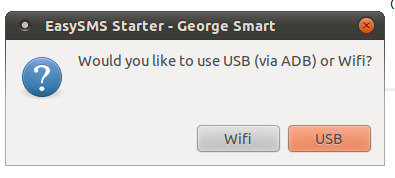
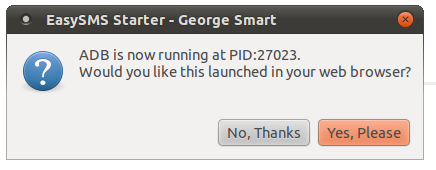
This bash script allows for a "button press" approach. It's complete enough to have basic checking, but it's not fool proof. But it's good enough for my use, and I assume it may be useful for others too. It has a Zenity interface (for use with Gnome) but also talks nicely to the terminal. It may require some modifications for use with KDE (just find/replace Zenity with KDEDialog - or whatever it is).
You will need to edit the file, as the first few lines set the ADB location, your preferred browser path, and an icon (for prettiness).

Bash Script : EasySMS.sh
Also available as a File:EasySMS.sh
#
# EasySMS Starter Script for Wifi and USB
# George SMART (M1GEO)
# Friday, 5th November 2010
#
# http://www.george-smart.co.uk/
#
# Absolute path to adb and a nice icon
ADBPATH="/opt/android-sdk-linux_86/tools/adb"
ICOPATH="/opt/android-sdk-linux_86/android.ico" # taken from the google website, not necessary, just pretty.
BROWSER="google-chrome"
echo -n "Starting EasySMS via "
zenity --question --window-icon="$ICOPATH" --title="EasySMS Starter - George Smart" --text="Would you like to use USB (via ADB) or Wifi?" --ok-label="USB" --cancel-label="Wifi"
if [ $? -eq 0 ]; then
# USB
echo "USB"
echo "Killing any existing adb sessions"
killall adb
killall adb
exitstatus=1;
count=1
if [ "x$exitstatus" != "x0" ]; then
zenity --info --window-icon="$ICOPATH" --title="EasySMS Starter - George Smart" --text="Starting ADB. Please wait." &
startbox=$!
while [ $exitstatus -ne 0 ]; do
$ADBPATH forward tcp:2511 tcp:2511
exitstatus=$?
echo "System call exited with $exitstatus on attempt $count"
count=$(($count+1))
# after 10 goes, if we cant get adb running nicely, give up.
if [ $count -eq 10 ]; then
kill $startbox # remove old zenity message
echo "There seems to be a problem: ADB won't start nicely!"
zenity --info --window-icon="$ICOPATH" --title="EasySMS Starter - George Smart" --text="ADB could not be started. Script exiting."
sleep 1
exit 1
fi
if [ $exitstatus -ne 0 ]; then
sleep 1
fi
done
fi
existingpid=`pgrep adb`
msg="ADB is now running at PID:$existingpid."
phoneip="localhost:2511"
else
# WIFI
echo -n "Wifi to "
phoneip=`zenity --entry --window-icon="$ICOPATH" --title="EasySMS Starter - George Smart" --text="Please enter the IP address of the phone. Note, it must be on a local network."`
phoneip="$phoneip:2511"
if [ $? -eq 0 ]; then
echo "$phoneip"
else
echo "NaN"
zenity --info --window-icon="$ICOPATH" --title="EasySMS Starter - George Smart" --text="Cancelled."
echo "User Cancelled at IP entry."
exit -1
fi
msg="Connect to EasySMS via wifi at $phoneip."
fi
echo -n "$msg Launch browswer? (Y/N):"
zenity --question --window-icon="$ICOPATH" --title="EasySMS Starter - George Smart" --text="$msg\nWould you like this launched in your web browser?" --ok-label="Yes, Please" --cancel-label="No, Thanks"
if [ $? -eq 0 ]; then
# Yes
echo "Yes"
echo "Launching: $BROWSER http://$phoneip/index.html"
nohup $BROWSER "http://$phoneip/index.html" &
else
# NO
echo "No"
echo "Visit: http://$phoneip/index.html"
zenity --info --window-icon="$ICOPATH" --title="EasySMS Starter - George Smart" --text="Visit http://$phoneip/index.html with a web browser."
fi